Survey Defaults
Icon: |
 |
Introduction
The Survey Defaults form provides you with a centralised location for key
settings controls: coordinate systems, point styles, code sets, survey line
settings and default point group. Once set, this establishes your drawing
setup for input and output behaviour.
The Survey Defaults sets the default settings that will be applied for numeric and alphanumeric coded points found in the drawing:
-
Coordinate System: MGA location of the points
-
Alpha Default: Point Style Code Name
-
Numeric Defaults: Point Style Code Numbers
-
Point Groups: Defined point style groups
The Survey Defaults are displayed when creating survey strings and, if using Stringer Topo, when using the Import and Reduce command and creating a new survey.
Details
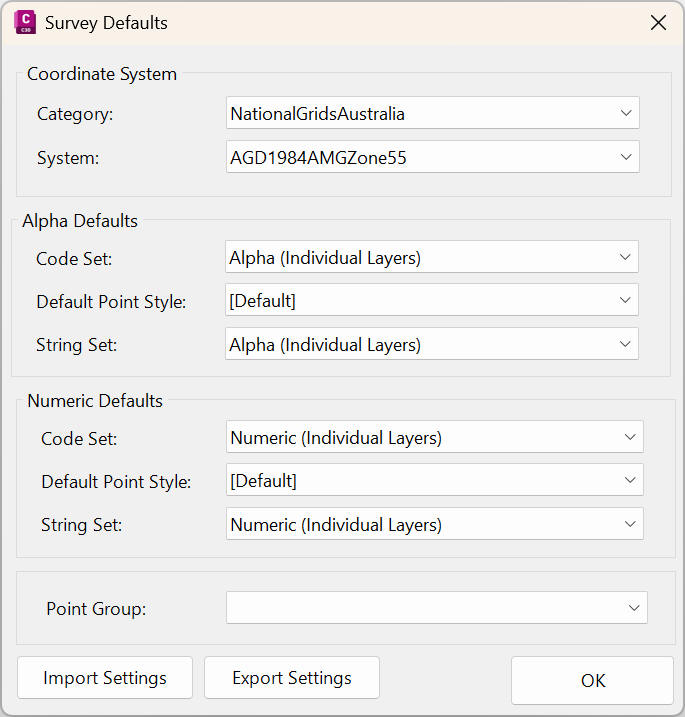
Upon selecting the command the following form is displayed:
|
|
|
|
Coordinate System |
These settings options will be applied to the-cogo points coordination. |
|
Category |
Select a deafult location from the list. |
|
System |
Select a default zone from the list. |
|
Alpha Defaults |
These settings options will be displayed when alphanumeric cogo points are found in the drawing or source data |
|
Code Set |
Select a default Point Code Set |
|
Default Point Style |
Select a default Point Style. |
|
String Set |
Select a Survey String Settings table. |
|
Numeric Defaults |
These settings options will be displayed when numeric cogo points are found in the drawing or source data |
|
Code Set |
Select a default Point Code Set |
|
Default Point Style |
Select a default Point Style. |
|
String Set |
Select a Survey String Settings table. |
|
Point Group |
Select the default point style group from the list. |
|
Import Settings |
Slect the settings file to import |
|
Export Settings |
Select the settings file to export. |
|
OK |
Apply and exit. |