Split by Distance
Icon: |
 |
Shortcut |
SSS |
Introduction
Split by Distance automates the removal of survey string segments. This is achieved by incrementing the String number for all points along the original survey string after each segment that is removed.
Note: If executed from the ribbon or via shortcut menu, the process is:
-
Select the survey string
-
At the command prompt, type a length. Segments greater than that length will be removed and the subsequent point code incremented.
Details
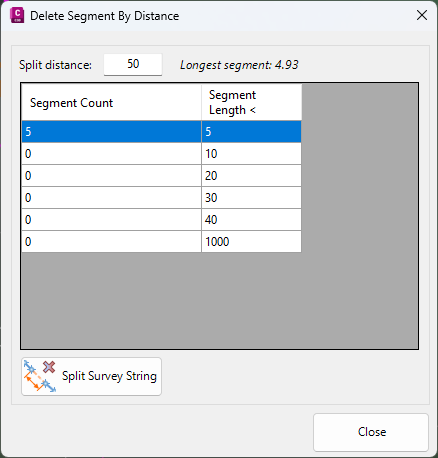
Upon selecting the command the following form is displayed:
|
|
|
|
Split Distance |
Type in a distance for the maximum segment length. The longest segment length will be noted. |
|
Segment Count List |
List of segments in the survey string, sorted by length ranges. |
|
Segment Count |
Number of segments less than the listed 'Segment Length <' and greater than the segment length in the previous entry. |
|
Segment Length < |
Type in segment length values to set a segment length range |
|
Split Survey String |
Click to delete string segments exceeding the length specified. The String number of points after each delete segment will be incremented by one, or to the next unique string number. |
| Close | Close the form |